Resilient machine control design
Article#: 00113
Date: 2025-11-23
Author: Radim

Modern industrial machines today are equipped with a wide range of advanced systems: extensive HMI panels, connections to corporate networks, communication with higher-level MES systems, diagnostics, and detailed data protocols.
These functions provide convenience, greater control over the process, and better optimization capabilities.
At the same time, however, they increase the complexity of the entire solution and the sensitivity to failures that may occur practically anywhere - from communication issues to unexpected errors in any software layer.
If machines are interconnected and dependent on HMI, SCADA, or network infrastructure, then a failure in any of these layers can stop the entire production process.
In such cases, it becomes clear that these "comfort" higher-level functions can also become sources of problems and the reason for a production stop, which may result in a significant financial loss.
This is why the concept of Resilient machine control design is worth considering - a design approach that enables a machine to continue operating even if one of the "comfort" higher-level system layers fails.
It does not mean a step back to outdated technologies, but a deliberate decision to separate what is added value from what is the essential foundation for actual production.
A key element of such a design is a minimal, reliable, and as simple as possible basic control layer of the machine.
This is typically provided by a PLC with clearly defined functions and a few physical control elements, such as a start, stop, and reset button, along with simple indicator lights showing the machine status.
This part should be designed to operate regardless of whether the HMI is available, whether the SCADA is communicating, or whether the communication path to a higher-level system is configured correctly.
The advantage of physical controls is their direct wiring: they do not depend on HMI software, network configuration, or whether an unexpected update happens to be triggered somewhere.
The HMI provides detailed diagnostics, recipe changes, graphs, alarms, remote access, etc.
These functions are very useful, but they should not be a requirement for the machine to start or continue production.
If the "comfort" higher-level layer becomes temporarily non-functional, the basic logic in the PLC must be able to keep production running - in a less comfortable, but still safe and predictable way.
Resilient machine control design provides a significant advantage and increases the overall reliability and availability of the machine - meaning the proportion of time it can actually produce compared to the time it is down due to a failure or error in a "comfort" higher-level layer.
It is of course important to remember that even the Resilient machine control design architecture has its limits.
Failures can also occur at the level of the PLC itself or other key control components.
I will address these topics in future articles on the blog, because there are also methods and strategies for preparing for such situations effectively.
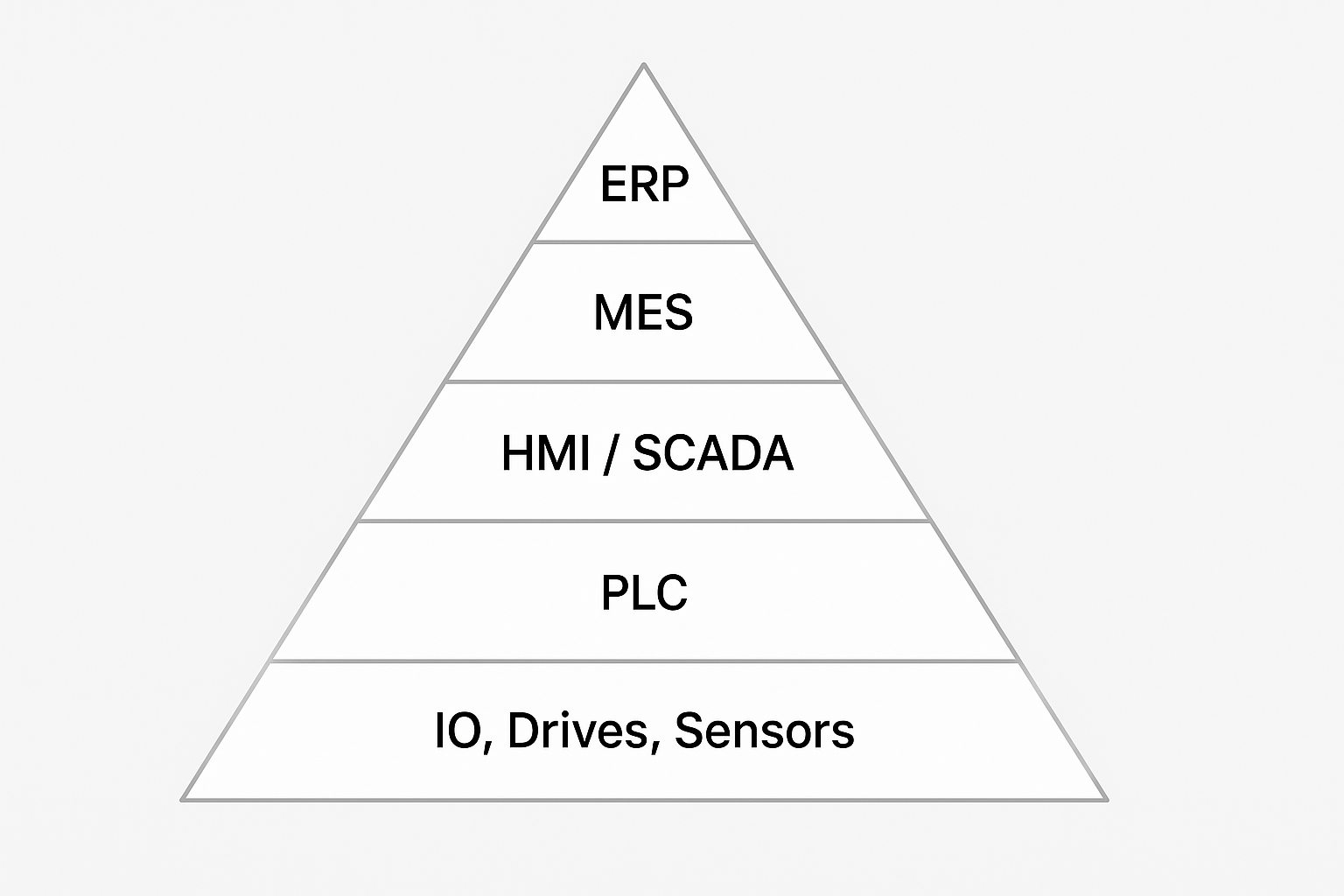
ISA-95 Automation Pyramid
© Radim-Automation, 2020–2026. All rights reserved.
Sharing of this article is permitted with proper attribution (link to the original page).
Related previous articles:
- When a touch panel isn't enough
- Dream of a platform-independent PLC program
- PLC network diagram
- Diagnostic tools
- It doesn't work without sensors
- Clear signals
- Design considerations for effective HMIS
- Software update
- Safety relays versus safety PLC
- Machine modularization
- Hardware concept
- A good concept = Complete set of suitable solutions
- Are there also any disadvantages?
- Think critically!
- Design machines with a focus on user's abilities and needs
- Why do automation projects fail?
- Collect all the requirements and sort them!
- Who will operate?
- Functional and intuitive HMI
- HMI and PLC applications should grow together
- More than just start and stop
- Safety first!
- Do the right things and do them right!
- Define test scenarios and test cases continuously!
- Don't make it worse!
- Industrial evolution - Listen to your customers and follow new trends!
- Focus on target!
- Don't hide any problem!
- Check the result!
- Keep it simple!
- Success is not a matter of coincidence
- Development is evolution
- Transparency and reliability
- From an idea to a consistent system
Related next articles:
- How long will a failure keep our production down?
- Redundant PLC – Yes or No?
- Buttons: Start, Stop and one more
- Different types of machine stops
- Safety stops must have the highest priority
- Danger! Unexpected machine start
- Buttons reset and start
- Slow graphical user interface
Comment#: 00001
Date: 2025-12-13
User: Radim
In one of my past projects, we addressed the question of properly defining the role of the SCADA system (Supervisory Control and Data Acquisition), and looking back, I can say the chosen concept proved very effective. We had a complex SCADA visualization running on an IPC and connected to approximately 10-30 PLCs. The SCADA provided practically everything expected from a modern system - process value monitoring, setpoint adjustments, user management, trending, alarms, troubleshooting, contextual help, data acquisition with statistics, recipe management, and many other features. It was an indispensable part of the machine’s comfortable operation.
However, from the very beginning, we defined the SCADA as a "CMU" - Central Monitoring Unit. The word monitoring was absolutely essential, because the goal was to ensure that the machine remained operational even without the SCADA running. That meant that not all parameters could be adjusted and advanced diagnostic or statistical tools were not available without SCADA, but the machine’s core operation did not depend on it.
This philosophy turned out to be very wise, especially because the machine ran in a continuous 24/7 production environment, where every minute of downtime represented a significant financial loss. Thanks to the fact that SCADA was treated as a comfort layer rather than a requirement for machine operation, updates and maintenance of the SCADA system could be performed while the machine continued producing.
This experience clearly illustrates the importance of distinguishing between the essential control logic and the comfort layers of the system - and shows how much benefit a resilient and independent machine control design can bring.